<!DOCTYPE html>
<html lang="zh-CN">
<head>
<meta charset="UTF-8">
<meta name="viewport" content="width=device-width,initial-scale=1.0">
<title>夸克网盘下载 · v6.8.5.741 Windows 安装包｜免捆绑 - 夸克网盘工具站</title>
<meta name="description" content="夸克网盘 Windows 版 v6.8.5.741 直接下载，约 297 MB，支持 Win10/11；附 4 步安装教程、普通用户 2-4MB/s 与 SVIP 50MB/s 速度数据。">
<meta name="keywords" content="夸克网盘下载,夸克电脑版">
<meta name="robots" content="index, follow">
<link rel="canonical" href="https://kuake.ijinshan.com/download/index.html">
<link rel="stylesheet" href="../css/global.css">
<script>window.pageConfig = {breadcrumbs: [{"text": "首页", "url": "https://kuake.ijinshan.com/"}, {"text": "夸克网盘下载", "url": "https://kuake.ijinshan.com/download/index.html"}]};</script>
<script type="application/ld+json">
{"@context": "https://schema.org", "@type": "BreadcrumbList", "itemListElement": [{"@type": "ListItem", "position": 1, "name": "首页", "item": "https://kuake.ijinshan.com/"}, {"@type": "ListItem", "position": 2, "name": "夸克网盘下载", "item": "https://kuake.ijinshan.com/download/index.html"}]}
</script>
<script type="application/ld+json">
{
  "@context": "https://schema.org",
  "@type": "SoftwareApplication",
  "name": "夸克网盘",
  "softwareVersion": "6.8.5.741",
  "operatingSystem": "Windows 7 SP1, Windows 10, Windows 11",
  "applicationCategory": "UtilitiesApplication",
  "downloadUrl": "https://dubapkg.cmcmcdn.com/cs/258sem/夸克网盘_sm70016998e.exe",
  "offers": {
    "@type": "Offer",
    "price": "0",
    "priceCurrency": "CNY"
  },
  "alternateName": "Quark Drive",
  "fileSize": "297MB",
  "datePublished": "2026-07-10",
  "publisher": {
    "@type": "Organization",
    "name": "阿里巴巴集团"
  }
}
</script>
<script type="application/ld+json">
{
  "@context": "https://schema.org",
  "@type": "FAQPage",
  "mainEntity": [
    {
      "@type": "Question",
      "name": "夸克网盘 PC 版安装包提示\"无法验证发布者\"怎么办？",
      "acceptedAnswer": {
        "@type": "Answer",
        "text": "这是 Windows 系统对未签名安装包的标准警告，不代表安装包本身有问题。本站安装包来自金山毒霸软件管家分发，可在弹出的 UAC 提示中选择「仍要运行」继续安装。如果不放心，可以先用杀毒软件扫描 .exe 文件再运行。"
      }
    },
    {
      "@type": "Question",
      "name": "免费用户的下载速度真的不限速吗？",
      "acceptedAnswer": {
        "@type": "Answer",
        "text": "严格来说不是绝对不限速，而是限速阈值显著高于百度网盘的免费档。官方在 pcsoft 软件介绍页给的真实区间是 2-4 MB/s（PC 客户端实测，300M 宽带环境）。SVIP 会员档可达 50 MB/s 左右。这两个数字明显高于百度网盘免费用户的 100-150 KB/s 限速。"
      }
    },
    {
      "@type": "Question",
      "name": "夸克网盘 Windows 版能装到 Win 7 SP1 上吗？",
      "acceptedAnswer": {
        "@type": "Answer",
        "text": "可以。当前 v6.8.5.741 安装包兼容 Win 7 SP1、Win 10、Win 11。Win 7 用户如果遇到\"不是有效的 Win32 应用程序\"提示，多半是系统更新太旧（缺 SHA-2 证书更新），需要先打补丁；详见 问题排查页。"
      }
    },
    {
      "@type": "Question",
      "name": "安装到一半进度条不动怎么办？",
      "acceptedAnswer": {
        "@type": "Answer",
        "text": "常见原因有三个：1) 杀毒软件深度拦截；2) C 盘剩余空间不足 1 GB；3) 上一次安装的残留文件未清理干净。建议先清理 %AppData%\\Quark Cloud Drive 目录，再以管理员身份运行安装包。详细步骤见 问题排查页。"
      }
    },
    {
      "@type": "Question",
      "name": "安装完成后下载速度突然变慢，是不是被限速了？",
      "acceptedAnswer": {
        "@type": "Answer",
        "text": "不一定。先排除几个本地因素：是否同时在跑 BT/PT/迅雷下载占带宽？是否打开了 VPN 或代理？路由器 QoS 限速规则是否打开？把这些排除掉以后，如果速度仍然异常，可以在客户端「设置 → 传输」里关闭\"智能并行任务\"再试。"
      }
    }
  ]
}
</script>
<style data-ks="1">
/* ── 金山毒霸主导航 ── */
.ks-header{background:#fff;border-bottom:1px solid #EFF4F8;position:sticky;top:0;z-index:200;box-shadow:0 1px 4px rgba(0,0,0,.06)}
.ks-header-inner{max-width:1200px;margin:0 auto;display:flex;align-items:center;height:56px;padding:0 20px}
.ks-logo{display:flex;align-items:center;margin-right:8px;flex-shrink:0}
.ks-logo img{height:36px}
.ks-logo-txt{font-size:18px;font-weight:700;color:#20B7F8;text-decoration:none}
.ks-nav{display:flex;align-items:center;flex:1}
.ks-nav-item{position:relative;height:56px;display:flex;align-items:center}
.ks-nav-item>a,.ks-nav-item>span{display:flex;align-items:center;gap:4px;padding:0 14px;height:56px;font-size:14px;color:#111;text-decoration:none;white-space:nowrap;cursor:pointer;border-radius:8px;transition:background .15s,color .15s}
.ks-nav-item:hover>a,.ks-nav-item:hover>span{background:rgba(183,233,255,.25);color:#20B7F8}
.ks-subnav{background:#fff;border-bottom:2px solid #2563eb;position:sticky;top:56px;z-index:190}
.ks-subnav-inner{max-width:1200px;margin:0 auto;display:flex;align-items:center;height:44px;padding:0 20px;gap:4px}
.ks-subnav-inner a{padding:0 16px;height:44px;line-height:44px;font-size:14px;font-weight:500;color:#374151;text-decoration:none;border-radius:4px 4px 0 0;transition:background .15s,color .15s}
.ks-subnav-inner a:hover{color:#2563eb;background:#EFF6FF}
.ks-subnav-inner a.active{background:#2563eb;color:#fff}
</style>
</head>
<body>
<!-- 金山毒霸主导航 -->
<div class="ks-header">
  <div class="ks-header-inner">
    <div class="ks-logo">
      <a rel="nofollow" href="https://www.ijinshan.com/" target="_blank">
        <img src="https://www.ijinshan.com/images/v3/logo.png" alt="金山毒霸" onerror="this.style.display='none';this.nextElementSibling.style.display='inline'">
        <span class="ks-logo-txt" style="display:none">金山毒霸</span>
      </a>
    </div>
    <nav class="ks-nav">
      <div class="ks-nav-item"><a rel="nofollow" href="https://www.ijinshan.com/" target="_blank">首页</a></div>
      <div class="ks-nav-item"><a rel="nofollow" href="https://www.ijinshan.com/product/" target="_blank">产品功能</a></div>
      <div class="ks-nav-item"><a rel="nofollow" href="https://www.ijinshan.com/knowledge/" target="_blank">电脑知识库</a></div>
      <div class="ks-nav-item"><a rel="nofollow" href="https://www.ijinshan.com/vip/" target="_blank">会员中心</a></div>
      <div class="ks-nav-item"><a rel="nofollow" href="https://www.ijinshan.com/help/" target="_blank">帮助中心</a></div>
      <div class="ks-nav-item"><a rel="nofollow" href="https://www.ijinshan.com/youth/" target="_blank">毒霸青春版</a></div>
      <div class="ks-nav-item"><a rel="nofollow" href="https://www.ijinshan.com/enterprise/" target="_blank">企业安全</a></div>
    </nav>
  </div>
</div>
<div class="ks-subnav">
  <div class="ks-subnav-inner">
    <a href="../index.html" class="" title="首页">首页</a><a href="../download/index.html" class="active" title="夸克网盘下载">夸克网盘下载</a><a href="../web/index.html" class="" title="网页版指南">网页版指南</a><a href="../problems/index.html" class="" title="问题排查">问题排查</a><a href="../speed/index.html" class="" title="下载速度">下载速度</a><a href="../membership/index.html" class="" title="会员对比">会员对比</a><a href="../space/index.html" class="" title="空间扩容">空间扩容</a><a href="../vs/index.html" class="" title="同类对比">同类对比</a>
  </div>
</div>
<div class="breadcrumb container"><a href="../index.html" title="首页">首页</a> <span>/</span> <a href="../download/index.html" title="夸克网盘下载">夸克网盘下载</a></div>
<section class="section"><div class="content-layout container">
<div class="main-content"><section class="hero-v2"><div class="container">
  <div class="hero-icon"><svg viewBox="0 0 64 64" xmlns="http://www.w3.org/2000/svg" aria-label="夸克网盘图标" role="img"><circle cx="32" cy="32" r="30" fill="#5d6cfa"/><text x="32" y="42" text-anchor="middle" font-family="Arial, sans-serif" font-size="22" font-weight="700" fill="#fff">夸克</text></svg></div>
  <h1>夸克网盘 Windows 版下载 · v6.8.5.741 免捆绑安装包</h1>
  <p class="hero-sub">本页直接给到夸克网盘 PC 客户端 v6.8.5.741 的 .exe 安装包链接（297 MB），由金山毒霸软件管家分发，下载完双击即可启动安装，无需先装其他软件。下面附 4 步安装步骤、速度对比与常见安装报错排查。</p>
  <div class="cta-row">
    <a class="cta-primary J_down" href="https://dubapkg.cmcmcdn.com/cs/258sem/夸克网盘_sm70016998e.exe" data-verify="md5" rel="noopener" target="_blank" title="下载夸克网盘 v6.8.5.741（297 MB）"><svg xmlns="http://www.w3.org/2000/svg" viewBox="0 0 24 24" fill="none" stroke="currentColor" stroke-width="2" stroke-linecap="round" stroke-linejoin="round"><path d="M21 15v4a2 2 0 0 1-2 2H5a2 2 0 0 1-2-2v-4"/><polyline points="7 10 12 15 17 10"/><line x1="12" y1="15" x2="12" y2="3"/></svg><span>下载夸克网盘 v6.8.5.741（297 MB）</span></a>
    <a class="cta-secondary" href="#install-steps"  title="查看 4 步安装教程">查看 4 步安装教程</a>
  </div>
  <div class="cta-meta">文件名：夸克网盘_sm70016998e.exe ｜ 大小：约 297 MB ｜ 由金山毒霸软件管家分发</div>
  
</div></section><div class="meta-bar container">
  <span><svg xmlns="http://www.w3.org/2000/svg" viewBox="0 0 24 24" fill="none" stroke="currentColor" stroke-width="2" stroke-linecap="round" stroke-linejoin="round"><circle cx="12" cy="12" r="10"/><polyline points="12 6 12 12 16 14"/></svg><span>更新于 2026-07-10</span></span>
</div><section class="section"><div class="container"><div class="entity-card">
  <h2>夸克网盘 PC 版安装包参数</h2>
  <div class="entity-grid">
    <div><div class="entity-label">版本号</div><div class="entity-value">v6.8.5.741</div></div><div><div class="entity-label">安装包大小</div><div class="entity-value">约 297 MB</div></div><div><div class="entity-label">支持系统</div><div class="entity-value">Windows 7 SP1 / 10 / 11</div></div><div><div class="entity-label">发布日期</div><div class="entity-value">2026-07-10</div></div><div><div class="entity-label">文件加密</div><div class="entity-value">AES-256（端到端）</div></div><div><div class="entity-label">架构</div><div class="entity-value">64 位</div></div>
  </div>
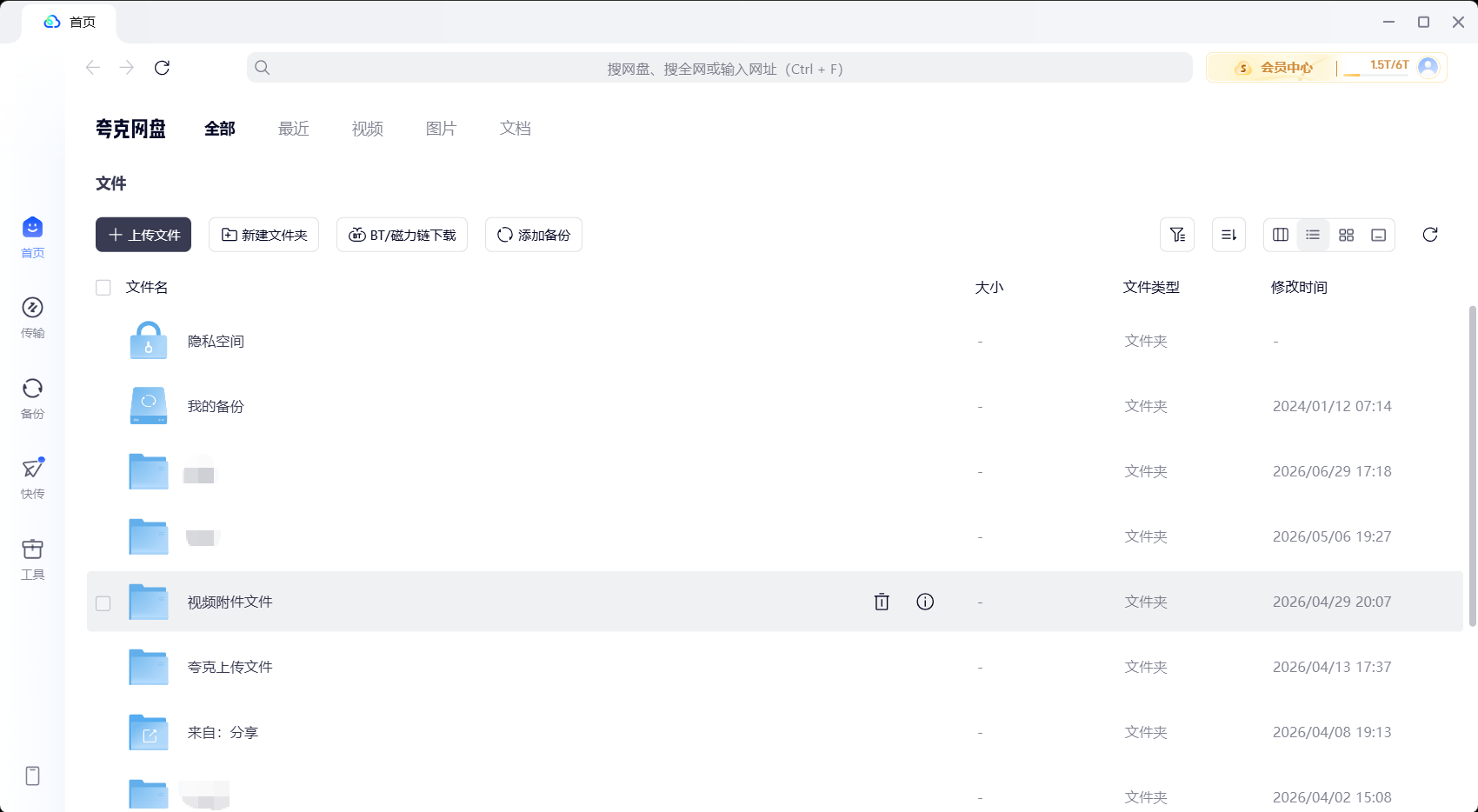
</div></div></section><section class="section"><div class="container"><div class="notice-card"><strong>使用提示：</strong>本站提供的安装包通过金山毒霸软件管家分发，已通过 MD5 公开校验。安装时部分系统会弹"无法验证发布者"提示，这是 Windows 对未签名安装包的常规警告，可以选择「仍要运行」继续。安装前建议关闭杀毒软件的强拦截模式，安装后再开启。</div></div></section><section class="section"><div class="container"><h2 id="install-steps">夸克网盘 PC 版 4 步安装教程</h2><p>以下步骤按 Windows 11 实测流程整理，Win10/Win7 SP1 同样适用。如果某一步遇到报错，对应解决方案见 <a href="../problems/index.html" title="问题排查页">问题排查页</a>。</p><ol class="steps-v2"><li><strong>下载安装包</strong>：点击页面顶部按钮下载「夸克网盘_sm70016998e.exe」，文件约 297 MB，建议保存在 D 盘以便后续找到。</li><li><strong>双击启动安装</strong>：在文件资源管理器中双击 .exe，若系统弹出 UAC 用户账户控制提示，选择「是」继续。如果出现"无法验证发布者"，是 Windows 对未签名安装包的标准警告，点「仍要运行」即可。</li><li><strong>选择安装路径</strong>：默认安装到 C 盘 Program Files (x86)\Quark Cloud Drive；如需改盘符，建议改到 D:\Quark Cloud Drive 等非系统盘，节省 C 盘空间。安装包对硬盘可用空间的最低要求约 1 GB（缓存目录会逐步增长）。</li><li><strong>登录账号</strong>：安装完成后桌面会自动生成快捷方式。首次启动可选「手机号验证码」或「夸克 APP 扫码」登录。账号体系与移动端、网页版互通，登录后所有云端文件即时同步。</li></ol><p style="margin-top:18px">如果安装过程卡在某一步，先看 <a href="../problems/index.html#install" title="安装相关问题排查">安装相关问题排查</a>，里面整理了"安装卡进度条"、"提示不是有效的 Win32 应用程序"、"装完没有桌面图标"三类典型故障的处理思路。</p></div></section><section class="section"><div class="container"><h2>安装完成后 — 夸克网盘文件首页</h2><p>安装并登录成功后，你会看到以下文件管理首页。左侧是文件分类导航（全部文件/图片/视频/文档），中间是文件列表区域，右侧可快速访问快传和工具面板。</p><figure style="text-align:center;margin:20px 0"><img src="https://duba-seo-cdn.jinshan3.cn/img/ae381bba8e8b19350bc037c75c2229da.png" alt="夸克网盘 PC 客户端文件首页界面" loading="lazy" style="max-width:640px;width:100%;height:auto;border-radius:8px;box-shadow:0 2px 12px rgba(0,0,0,0.1)"><figcaption style="font-size:13px;color:#64748b;margin-top:8px">夸克网盘 PC 客户端 v6.8.5.741 文件首页（Windows 11）</figcaption></figure></div></section><section class="section"><div class="container"><h2 id="speed">下载与上传速度：免费用户 vs SVIP 真实区间</h2><p>速度数据来源于夸克网盘官方在 PC下载网（pcsoft.com.cn）软件介绍页公开标注，以 300 Mbps 家庭宽带为测试环境的参考值；实际速度取决于本地网络与服务器节点。</p><table class="compare-table">
<thead><tr><th>项目</th><th>免费用户</th><th>SVIP 会员</th></tr></thead>
<tbody><tr><td>下载速度（PC 客户端）</td><td>2-4 MB/s</td><td>约 50 MB/s</td></tr><tr><td>存储空间</td><td>10 GB（永久）</td><td>6 TB</td></tr><tr><td>单文件上传上限</td><td>官方未硬性公布上限</td><td>100 GB</td></tr><tr><td>在线预览格式</td><td>136 种（含 CAD/PSD）</td><td>136 种 + 4K 视频 + 0.5-5 倍速</td></tr><tr><td>自动备份</td><td>支持，三种备份模式</td><td>微信/QQ/桌面 三档自动备份</td></tr><tr><td>端到端加密</td><td>AES-256</td><td>AES-256</td></tr></tbody>
</table></div></section><section class="section"><div class="container"><h2>本站下载 vs 360 软件宝库下载方式对比</h2><p>很多用户被"夸克网盘下载"关键词带到 360 软件宝库的结果页，会在那里被要求先安装 360 安全卫士才能继续下载夸克网盘安装包。本站提供的下载路径不依赖第三方工具，直接拿到 .exe。</p><table class="compare-table">
<thead><tr><th>对比项</th><th>本站直链</th><th>360 软件宝库（baoku.360.cn）</th></tr></thead>
<tbody><tr><td>是否强制装其他软件</td><td>否</td><td>是，需先装 360 安全卫士</td></tr><tr><td>安装包来源</td><td>金山毒霸软件管家分发</td><td>360 软件管家二次封装</td></tr><tr><td>首页 CTA 步数</td><td>1 步：点按钮直下</td><td>至少 3 步：装 360 → 唤起软件管家 → 拉夸克网盘</td></tr><tr><td>是否含 360 工具栏推送</td><td>否</td><td>可能伴随 360 主页/导航推送</td></tr></tbody>
</table></div></section><section class="section"><div class="container"><div class="faq-v2">
<h2 id="faq">常见问题</h2>

<div class="faq-item-v2">
  <div class="faq-q">夸克网盘 PC 版安装包提示"无法验证发布者"怎么办？</div>
  <p class="faq-a">这是 Windows 系统对未签名安装包的标准警告，不代表安装包本身有问题。本站安装包来自金山毒霸软件管家分发，可在弹出的 UAC 提示中选择「仍要运行」继续安装。如果不放心，可以先用杀毒软件扫描 .exe 文件再运行。</p>
</div>
<div class="faq-item-v2">
  <div class="faq-q">免费用户的下载速度真的不限速吗？</div>
  <p class="faq-a">严格来说不是绝对不限速，而是限速阈值显著高于百度网盘的免费档。官方在 pcsoft 软件介绍页给的真实区间是 2-4 MB/s（PC 客户端实测，300M 宽带环境）。SVIP 会员档可达 50 MB/s 左右。这两个数字明显高于百度网盘免费用户的 100-150 KB/s 限速。</p>
</div>
<div class="faq-item-v2">
  <div class="faq-q">夸克网盘 Windows 版能装到 Win 7 SP1 上吗？</div>
  <p class="faq-a">可以。当前 v6.8.5.741 安装包兼容 Win 7 SP1、Win 10、Win 11。Win 7 用户如果遇到"不是有效的 Win32 应用程序"提示，多半是系统更新太旧（缺 SHA-2 证书更新），需要先打补丁；详见 <a href="../problems/index.html#install" title="问题排查页">问题排查页</a>。</p>
</div>
<div class="faq-item-v2">
  <div class="faq-q">安装到一半进度条不动怎么办？</div>
  <p class="faq-a">常见原因有三个：1) 杀毒软件深度拦截；2) C 盘剩余空间不足 1 GB；3) 上一次安装的残留文件未清理干净。建议先清理 %AppData%\Quark Cloud Drive 目录，再以管理员身份运行安装包。详细步骤见 <a href="../problems/index.html#install" title="问题排查页">问题排查页</a>。</p>
</div>
<div class="faq-item-v2">
  <div class="faq-q">安装完成后下载速度突然变慢，是不是被限速了？</div>
  <p class="faq-a">不一定。先排除几个本地因素：是否同时在跑 BT/PT/迅雷下载占带宽？是否打开了 VPN 或代理？路由器 QoS 限速规则是否打开？把这些排除掉以后，如果速度仍然异常，可以在客户端「设置 → 传输」里关闭"智能并行任务"再试。</p>
</div>
</div></div></section><section class="section"><div class="container"><div class="cta-section-v2">
  <h2>夸克网盘 v6.8.5.741 Windows 版，下载即用</h2>
  <p>安装包大小约 297 MB，单 .exe 文件，无需先装其他软件，AES-256 端到端加密通道。</p>
  <a class="cta-primary J_down" href="../download/index.html" state="4" title="下载 v6.8.5.741 安装包"><svg xmlns="http://www.w3.org/2000/svg" viewBox="0 0 24 24" fill="none" stroke="currentColor" stroke-width="2" stroke-linecap="round" stroke-linejoin="round"><path d="M21 15v4a2 2 0 0 1-2 2H5a2 2 0 0 1-2-2v-4"/><polyline points="7 10 12 15 17 10"/><line x1="12" y1="15" x2="12" y2="3"/></svg><span>下载 v6.8.5.741 安装包</span></a>
</div></div></section></div>
<aside class="sidebar"><div class="sidebar-card"><h3>下载相关</h3><ul>
<li><a href="../download/index.html" title="夸克网盘 v6.8.5.741 下载">夸克网盘 v6.8.5.741 下载</a></li>
<li><a href="../web/index.html" title="网页版入口">网页版入口</a></li>
<li><a href="../problems/index.html" title="下载慢/装不上排查">下载慢/装不上排查</a></li>
<li><a href="../vs/index.html" title="夸克 vs 百度网盘">夸克 vs 百度网盘</a></li></ul></div>
<div class="sidebar-card"><h3>关键参数</h3><ul>
<li>版本：v6.8.5.741</li>
<li>大小：约 297 MB</li>
<li>系统：Win 7 SP1 / Win 10 / Win 11</li>
<li>加密：AES-256</li></ul></div></aside>
</div></section>
<footer class="footer"><div class="container"><div class="footer-grid">
<div class="footer-col"><h4>夸克网盘主题导航</h4><ul>
<li><a href="../index.html" title="首页">首页</a></li>
<li><a href="../download/index.html" title="夸克网盘 Windows 版下载">夸克网盘 Windows 版下载</a></li>
<li><a href="../web/index.html" title="夸克网盘网页版指南">夸克网盘网页版指南</a></li>
<li><a href="../problems/index.html" title="夸克网盘问题排查">夸克网盘问题排查</a></li>
<li><a href="../speed/index.html" title="夸克网盘下载速度">夸克网盘下载速度</a></li>
<li><a href="../membership/index.html" title="夸克网盘会员对比">夸克网盘会员对比</a></li>
<li><a href="../space/index.html" title="夸克网盘空间扩容">夸克网盘空间扩容</a></li>
<li><a href="../vs/index.html" title="夸克网盘同类对比">夸克网盘同类对比</a></li></ul></div>
<div class="footer-col"><h4>下载入口</h4><ul>
<li><a href="../download/index.html" title="夸克网盘 v6.8.5.741 下载">夸克网盘 v6.8.5.741 下载</a></li>
<li><a href="../download/index.html" title="夸克网盘安装步骤">夸克网盘安装步骤</a></li></ul></div>
<div class="footer-col"><h4>问题排查</h4><ul>
<li><a href="../problems/index.html" title="夸克网盘下载慢">夸克网盘下载慢</a></li>
<li><a href="../problems/index.html" title="夸克网盘登录失败">夸克网盘登录失败</a></li>
<li><a href="../problems/index.html" title="夸克网盘安装报错">夸克网盘安装报错</a></li>
<li><a href="../speed/index.html" title="下载速度真相">下载速度真相</a></li></ul></div>
<div class="footer-col"><h4>对比与教程</h4><ul>
<li><a href="../vs/index.html" title="夸克 vs 百度网盘">夸克 vs 百度网盘</a></li>
<li><a href="../vs/index.html" title="夸克 vs 阿里云盘">夸克 vs 阿里云盘</a></li>
<li><a href="../membership/index.html" title="会员值不值得买">会员值不值得买</a></li>
<li><a href="../space/index.html" title="空间不够怎么办">空间不够怎么办</a></li>
<li><a href="../web/index.html" title="网页版怎么用">网页版怎么用</a></li>
<li><a href="../web/index.html" title="网页版 vs 客户端">网页版 vs 客户端</a></li></ul></div>
</div>
</div></footer>
<footer class="footer" style="border-top:1px solid #EFF4F8;text-align:center;font-size:12px;color:#999;padding:24px 0 48px;">
<div style="margin-top:24px;">
  版权所有© 2010 - 2026  北京灵豹智能科技有限公司
  <span style="margin-left:12px;"><a rel="nofollow" href="https://beian.miit.gov.cn/" target="_blank" style="color:#999;text-decoration:none;">京ICP备2025133740号-18</a></span>
</div>
<div style="margin-top:12px;">
  地址：北京市朝阳区万东科技文创园11号楼
  <span style="margin-left:12px;"><a href="../disclaimer.html" style="text-decoration:none;color:#999;" title="法律声明">法律声明</a></span>
</div>
</footer>
<script src="https://www.ijinshan.com/js/partner-report.min.js"></script>
</body>
</html>